
Voice-Activated Teleprompter for Windows
Your script moves when you speak and waits when you pause.
An illustration of how each mode behaves, not a screen recording. The real prompter is in the pictures below.
Free to start. Updated November 29, 2026
Short answer. MIRAY for Windows moves a script three ways: Classic (steady speed), Voice (scrolls while you speak, waits when you pause, any language) and Follow (matches your words and finds your place after a skip, in 11 languages). Speech is recognized on your PC. Voice is free for about 300 words a session; Follow is free on the sample script and for 3 sessions a week on your own.
Voice hears you. Follow reads along.
Both use your microphone and both run on the PC. They answer different questions: is the speaker talking? and which word are they on?
It knows when you speak
- Microphone
- Voice-activity check
- Scroll or hold
A small voice-activity model decides, many times a second, whether you are speaking. Speaking scrolls the script at your pace; a pause eases it to a stop, so a breath or a sip of water does not send the text running.
It never learns which words you said, which is why it works in every language and needs no download.
It knows which word you are on
- Microphone
- Speech to words
- Match to script
- Highlight and scroll
A streaming speech model turns what you say into words as you say them, and MIRAY matches them to your script. The highlighted word is the one you are on, and if you skip ahead it finds your place again.
English is built in. Other languages use a language pack you download once.
Pick the mode that fits how you speak
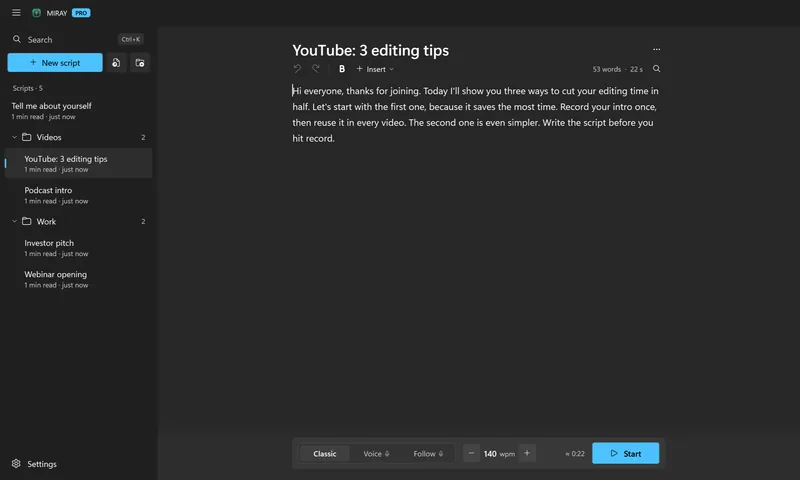
A Classic / Voice / Follow switch sits in the Studio’s dock and changes between takes. The reader, the Island, Float and Ghost layouts and your script stay the same.

Voice
Scrolls while you speak and eases to a stop when you pause. It listens for your voice, so any spoken language works and nothing needs downloading.
- Best for
- Scripts you read as written, in any language.
- Skip it if
- You ad-lib or jump around: it cannot tell which words you said.
- Adjust
- Voice sensitivity in Settings › Voice & Follow; Ctrl+Alt+Left steps back a line.
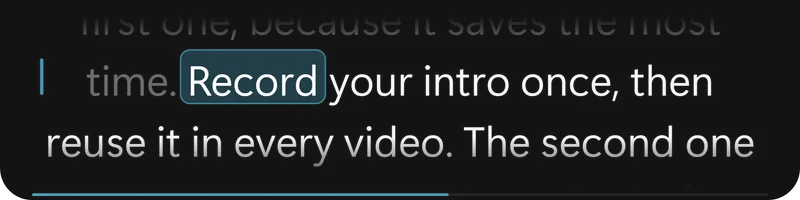
Follow
Matches your words to the script, highlights the one you are on and finds your place after a skip. Best when the talk is not exactly the text.
- Best for
- Bullet points, Q&A, live demos, takes you restart.
- Skip it if
- Your language is outside the 11, or you want nothing to download.
- Adjust
- Add a language once in Settings › Voice & Follow. Free: the sample any time, your own script 3 sessions a week.
Classic
A steady scroll from 60 to 300 words a minute (140 by default), with [pause 2s] marks where you want a held beat. It is the fallback if Windows blocks the microphone.
- Best for
- Readers who keep an even pace, or rooms where a microphone is a problem.
- Skip it if
- Your pace varies: you will drift from the text.
- Adjust
- Ctrl+Alt+Up and Down change the speed.
What stays on your PC
MIRAY’s own setting says it: “Audio is processed on this PC and never stored or sent.” It records no audio or video.
Audio
The microphone signal is processed on the PC. Nothing is stored and nothing is sent.
Recognition
English is built in. Other Follow languages run offline after a one-time language pack.
The network
Used for the Microsoft Store and the optional language pack, nothing else. No account, no telemetry.
The microphone
Used only in Voice and Follow, while you read. If Windows blocks it, MIRAY says so and switches to Classic.
The privacy policy covers the Windows app and this website.
11 languages, offline after one download
Add a language once in Settings › Voice & Follow. The multilingual pack covers eight languages in one download, so a second language from that group costs nothing more. Voice mode needs none of this.
Built in
No download
- English
About 682 MB
Multilingual pack, 8 languages
- Español
- Português
- Français
- Italiano
- Deutsch
- Polski
- 日本語
- 한국어
About 167 MB
Chinese pack
- 中文
About 24 MB
Turkish pack
- Türkçe
What is free, with the cap named
| Feature | Free | One-time upgrade |
|---|---|---|
| Voice and Classic | About 300 words a session (about 2 minutes of speech) | No length limit |
| Follow on the sample script | Any time | Any time |
| Follow on your own script | 3 sessions a week; restarting the same script within 10 minutes is a retake and is not counted | Every time |
| Scripts | One of your own, plus the sample | Unlimited, in folders |
| Island, Float, Ghost, hidden from screen share, every import format | Included | Included |
Free: Classic and Voice scrolling for about 300 words a session (about 2 minutes), one script of your own, Island, Float and Ghost, hidden from screen share, every import format, and Follow 3 sessions a week. The upgrade is a one-time $19.99 (US price; local prices vary), no subscription: unlimited length, unlimited scripts, Follow every time. Not sure the screen-share part holds on your setup? Test it in 60 seconds. The buy page has the full comparison.
Where Voice and Follow fall short
Follow needs a download
Outside English, the first use needs a pack of 24 to 682 MB. Follow supports 11 languages. Voice has no such limit.
Voice follows your voice, not your words
If you leave the script and keep talking, Voice keeps scrolling. Use Follow, or step back with Ctrl+Alt+Left and pause with Ctrl+Alt+Space.
Noise matters
With sensitivity too high, loud noise nearby counts as speech. Lower Voice sensitivity, or use a headset or a close microphone.
Free Follow is capped
Three sessions a week on your own script. Voice and Classic still work after that.
Windows only
There is no Mac, Linux or phone version of the app. The free web teleprompter runs in any browser, with the limits in the table below.
Not a transcript
MIRAY shows your script and records nothing, so there is no text of what you said afterwards.
The free web version, and how it differs
The teleprompter on the home page is a separate free tool: it scrolls with your voice, has no word limit and asks for the microphone only after you press Start Voice. Both are free to start.
| Question | Free web teleprompter | MIRAY for Windows |
|---|---|---|
| Scrolls with your voice | Yes | Yes (Voice), any language |
| Tracks your words | Where your browser supports speech matching; it labels which kind | Follow, 11 languages, recognized on your PC |
| Works fully offline | Depends on the browser | Yes, after the language pack |
| Stays out of a screen share | No | Yes (not over Remote Desktop); test it in 60 seconds |
| Floats over other windows | In a pop-out window, where the browser supports it | Island, Float and Ghost |
| Length limit | None | About 300 words a session free; none with the upgrade |
| Where your script lives | In your browser only | On your PC |
Voice or Follow in five minutes
- Install MIRAY. Get it from the Microsoft Store: about 184 MB, Windows 10 version 2004 or later, and Windows 11. No account.
- Paste or import a script. Paste with Ctrl+Alt+V, or import a .txt, .md, .docx, .pdf or the speaker notes of a .pptx.
- Choose Voice or Follow in the Studio’s dock. For a language other than English, add its pack in Settings › Voice & Follow first.
- Start and speak. After the countdown (3 seconds by default), read naturally. Pause, and the script waits.
Voice and Follow questions
What is a voice-activated teleprompter?
A teleprompter that moves the script because you are speaking, not because a timer says so. MIRAY has two ways to do it: Voice scrolls while you talk and waits when you pause, and Follow tracks the words you say, so it also finds your place when you skip ahead.
Does MIRAY work offline?
Yes, once it is installed. Speech is recognized on your PC and the audio is never stored or sent. English is built in. For the other ten Follow languages, MIRAY downloads one language pack the first time you add that language (24 to 682 MB, depending on the language), and recognition is offline after that. Voice mode needs no download.
Which languages does Follow understand?
Eleven: English, Spanish, Portuguese, French, Italian, German, Polish, Japanese, Korean, Chinese and Turkish. Voice mode listens for your voice, not your words, so it works in any language.
Is voice scrolling free?
Voice and Classic are free for about 300 words a session, about 2 minutes of speech. Follow is free on the sample script any time and for 3 sessions a week on your own script. The one-time upgrade removes the length limit and the Follow limit.
What if I go off script or skip a paragraph?
In Follow, MIRAY matches the words you say against your script and finds your place again, including after you skip ahead. In Voice mode it does not know which words you said: it only knows you are talking, so it keeps scrolling at your set pace, and you can step back a line with the hotkeys.
Does it need the internet, an account or a subscription?
No account, no subscription, and no internet for recognition. MIRAY goes online for the Microsoft Store and for the optional language pack download, and nowhere else.
What if Windows blocks the microphone?
MIRAY tells you and falls back to Classic scrolling. To fix it, turn on microphone access for desktop apps in Windows Settings › Privacy & security › Microphone.
Is there a free voice teleprompter in the browser?
Yes. The teleprompter at the top of the home page scrolls with your voice, has no word limit, and keeps your script in your browser. It is a separate tool from the Windows app: it cannot stay out of a screen share or float over other windows, and its word matching depends on what your browser supports.
Hear it follow you
Install MIRAY, paste a script and read it out loud once. Voice is free for about 300 words a session; no account.
Windows 10 version 2004 or later, and Windows 11. About 184 MB.
- Hidden from screen shareWhat it does, and where it stops.
- Island and Ghost modeUnder your webcam, or see-through.
- Import and presetsWord, PDF and PowerPoint notes.
- Zoom presentationsRead while you present.
- BuyFree and the one-time upgrade, side by side.
- DocumentationSetup and settings, step by step.