
Teleprompter for Sales Demos
Read your battle cards under the webcam while the buyer sees only your product.
Your monitor
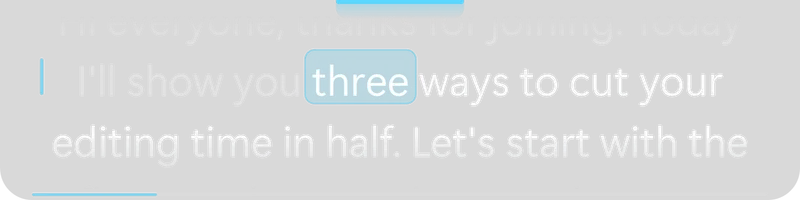
Your battle cards sit under the webcam. Only you see them.
An illustration of the setup, not a screen recording. MIRAY does not drive your demo: you click, and the cards stay out of the share.
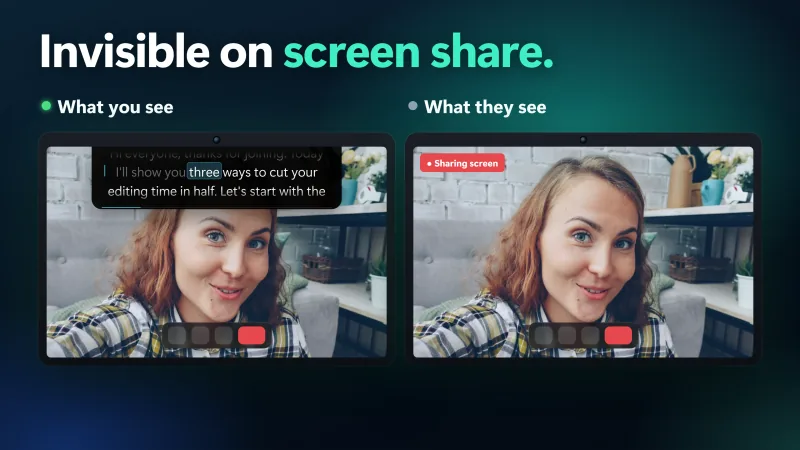
Short answer. Write your battle cards as one script with a heading for each, dock MIRAY’s Island under your webcam and share your entire screen: the buyer gets your product and your face, and the cards stay on your monitor, because MIRAY asks Windows to leave its window out of screen capture. Ghost lets you click the product through the text, and Voice waits while the buyer talks. The free version reads about 300 words a session, about 2 minutes of speech: an opening and a few short cards fit, a full talk track needs the one-time upgrade.
Why a demo is the hard case for notes
A plain call lets you tuck notes under the webcam. A demo asks for more: the buyer watches your product, your hands are on the mouse, and the opening, the price answer and the next step still have to come out right.
The notes end up in the share
Share the whole screen with your talk track open and the buyer can read it. Switching windows mid-demo is how it usually happens.
Your eyes go sideways
A second monitor keeps notes private but pulls your gaze off the lens. A buyer who sees you glance away every sentence hears a script.
A question breaks your place
A scroller on a timer keeps moving while the buyer asks about price. When you come back, the line you were on is gone.
Five minutes before your next demo
- Install MIRAY from the Microsoft Store: Windows 10 version 2004 or later, or Windows 11, about 184 MB. No account.
- Add your cards. Build a starter set below, paste it with Ctrl+Alt+V, or import a Word, PDF, Markdown or text file. A PowerPoint import reads the speaker notes.
- Dock the Island under the webcam, or press Ctrl+Alt+F to float it next to the part of the product you are talking about.
- Turn on Ghost with Ctrl+Alt+G so your clicks pass through the text to the product.
- Share your entire screen and press Ctrl+Alt+Space. Pick Voice so the cards wait when you stop talking.
The three layouts are on the Island and Ghost page; import formats and the markup on the import page.
Build a talk track, and see where the free cap falls
Tick the cards you want, edit the text, and watch the word count. Copy it, then paste it into MIRAY with Ctrl+Alt+V. Each heading becomes a section cue. Nothing you type here leaves your browser.
0 words of about 300 free, about 0 min at 140 words a minute
Here is a starter set of six cards. Copy it, paste it into MIRAY with Ctrl+Alt+V and cut what you do not need.
## Opening
Glad you could join. [pause] I will **start with your goal** for this call, then show you how we get there.
What should we have decided by the end?

## Discovery
How do you handle this today?
Where does it slow your team down?
Who else signs off on a change like this?

## Price comes up
**Ask first:** what does one lost renewal cost you in a year? [pause 2s]
Then give the number and the range, and tie it to that cost.

## They name a rival
They are good at one thing. **We are built for another.** [pause]
Which of the two matters more to you?

## Security or IT asks
Keep it short. **Say what is stored and where.** Offer the written summary after the call.

## Next step
**Book the follow-up before we hang up.** Name the day and who joins.
## headings become section cues, [pause] or [pause 2s] holds Classic scrolling, and **bold** draws the words that must land. The count is our estimate of the spoken words; MIRAY ends a free session at the nearest sentence or line end. The six starter cards together are about 138 words, so they fit a free session; a full talk track is longer. The cards are prompts for your own words, not live answers.
What you press at each moment
Every key below is a global shortcut, so it works while the call app has the focus. You can change any of them in MIRAY’s settings.
| Moment | In MIRAY | Key | Free |
|---|---|---|---|
| Buyer joins, you are early | Dock the Island under the webcam | Ctrl+Alt+F | Yes |
| “Can you see my screen?” | Share the entire screen; hiding is already on | No key | Yes |
| The opening | Start reading (after a 3-second countdown by default) | Ctrl+Alt+Space | About 300 words a session |
| Clicking into the product | Ghost: see-through and click-through | Ctrl+Alt+G | Yes |
| The buyer asks a question | Voice waits while you listen; pause it outright if you prefer | Ctrl+Alt+Space | Yes |
| Back to your place | Back a line, or let Follow find you after a skip | Ctrl+Alt+← | Follow: 3 sessions a week |
| The next call | Back to the top of the script | Ctrl+Alt+Home | Yes |
| Wrapping up | Stop reading | Ctrl+Alt+X | Yes |
How Voice and Follow differ, and the 11 Follow languages (English built in, the others after a one-time pack download), are on the Voice and Follow page. Hover-to-pause is on by default: point at the reader and Classic and Voice hold.
Four ways to keep demo notes private, and where MIRAY fits
You may not need an app. Here is what each way does for a rep who shares a product.
| Way | Notes kept out of the share | Eyes near the lens | Cost |
|---|---|---|---|
| A second monitor | Yes, when you share the other screen | No, you look sideways | Free, if you own the screen |
| Share one window, notes in another | Yes, other windows are not sent | Only if you place the notes there | Free, part of your call app |
| Five points on a sticky note | Yes, it is off screen | Yes, beside the webcam | Free; holds a handful of lines |
| A teleprompter in a browser tab, ours included | Not in a whole-screen share | Yes, under the webcam | Our web teleprompter: free, no word limit |
| MIRAY for Windows | Yes, even in a whole-screen share (not over Remote Desktop) | Yes, docked under the webcam | Free for about 300 words a session |
If you have two monitors and are comfortable glancing sideways, a second screen is free and needs no app. MIRAY is for the rep with one screen who switches between a browser, the product and a deck. Sharing one window sends only that window, as Zoom’s and Microsoft’s support pages describe; we read those pages through search extracts on November 29, 2026.
Test it in 60 seconds, in your own call app
Check what the buyer gets on your own PC, in the app you sell on. Do not take our word for it.
- Start a meeting on your own in Zoom, Teams or Meet.
- Open MIRAY with a script and press Ctrl+Alt+Space.
- Share your entire screen, not a single window.
- Join the same meeting from your phone, or record ten seconds on this computer and play it back. The cards should be on your monitor and missing from the call.
Still showing? Check that you are on Windows 10 version 2004 or later and not in a remote session. The general version of this test, and what to do next, is on the screen-share page and the support page.
Your product and your face, without the cards
| On your PC | In the shared screen |
|---|---|
| MIRAY’s Island, Float or Ghost reader | Left out |
| MIRAY’s Studio window | Left out |
| Your product, browser or deck | Shared as usual |
| Your webcam video | Sent as usual; MIRAY does not use the camera |
| Chat, email and CRM pop-ups | Shared as usual: turn them off first |
The usual questions, answered
A company laptop
MIRAY installs from the Microsoft Store and needs no account. Apart from the Microsoft Store itself, it goes online only to download a Follow language pack, and speech is recognized on the PC; audio is never stored or sent.
Recorded calls
Sales calls are often recorded. MIRAY records nothing itself, and the Store listing says it is hidden from recordings in Zoom, Teams, Meet and OBS. Check a short recording of your own once, as in the test above.
CRM and live answers
None. MIRAY has no CRM link and gives no live suggestions. It shows the words you wrote. Keep each card to a few short lines you can glance at.
Voice and your speakers
Voice reacts to sound at your microphone. Our advice, not a tested claim: wear a headset so the buyer’s voice from your speakers does not count as yours.
Where MIRAY is not the answer
Free covers an opening, not a talk
Free reads about 300 words a session, about 2 minutes. An opening and a few short cards fit; a 30-minute talk track does not, and needs the one-time upgrade.
Remote Desktop shows it
Demo from a virtual desktop or a remote session and the reader is visible in the share. Demo from the PC in front of you.
A script can sound like one
Read word for word, a demo sounds rehearsed. Write cards as prompts, a few lines each, and look at the lens for the lines that matter.
Your words, not live answers
MIRAY does not listen to the buyer, search your CRM or suggest replies. It is a reader for what you wrote.
A camera still sees the screen
A phone pointed at your monitor shows everything on it. The hiding is a Windows capture setting, not a security feature.
Windows only
There is no Mac or phone app. On a Mac, share one window and keep the cards in another, or use our free web teleprompter.
What a rep gets free
| Feature | Free | One-time upgrade |
|---|---|---|
| Hidden from the screen share | Included, on by default | Included |
| Island under the webcam, Float, Ghost | Included | Included |
| Classic and Voice reading | About 300 words a session (about 2 minutes) | No length limit |
| Battle cards as scripts | One script of your own, with headings | Unlimited scripts, in folders |
| Follow on your own script | 3 sessions a week | Every time |
Free: Classic and Voice scrolling for about 300 words a session (about 2 minutes), one script of your own, Island, Float and Ghost, hidden from screen share, every import format, and Follow 3 sessions a week. The upgrade is a one-time $19.99 (US price; local prices vary), no subscription: unlimited length, unlimited scripts, Follow every time. The buy page has the full comparison.
Step-by-step guides for sales calls
Sales demo questions
How do I read a script during a software demo without the buyer seeing it?
Keep the notes out of what you share. A second monitor, or sharing one window with the notes in another, both work and cost nothing. When you share your whole screen on one monitor, MIRAY on Windows 10 version 2004 or later asks Windows to leave its window out of the capture, and that is on by default. Run the 60-second test once.
Can I use MIRAY for battle cards?
Yes. Write one script with a heading for each card. MIRAY turns Markdown headings into section cues, so each card is its own block in the reader. The builder above makes a starter set you can paste with Ctrl+Alt+V.
Will it follow me when the buyer interrupts?
In Voice mode the script scrolls while you speak and eases to a stop when you go quiet, so it waits during a question. Hover-to-pause is on by default too. If a question takes you off the track, Ctrl+Alt+Left goes back a line.
Can I click my product through the script?
Yes. Ghost makes the reader see-through and click-through (Ctrl+Alt+G), so a click lands on the product under it. Float lets you put the reader next to the part of the screen you are talking about.
Will MIRAY record my sales call?
No. MIRAY does not record video or audio, and it does not use the camera. Use your meeting tool’s own recording if you need one. The Store listing says MIRAY is hidden from screen sharing and recordings in Zoom, Teams, Meet and OBS; make a ten-second local recording once to check your own setup.
Does it sync with my CRM or give live answers?
No. MIRAY shows the words you wrote, nothing else: no CRM link, no live suggestions, no assessments. It is for reading your own talk track.
Is it free for sales calls?
MIRAY is free to start: Classic and Voice read about 300 words a session (about 2 minutes of speech), and hiding from the share is free. That fits an opening and a few short cards; a long talk track needs the one-time upgrade. The web teleprompter on our home page is free with no word limit, but a browser tab shows in a whole-screen share.
Does it work if I demo from a virtual desktop?
Not hidden. In a Remote Desktop or similar remote session, MIRAY shows its window normally and tells you once, because hiding it there would hide it from you as well. Demo from the PC in front of you, or keep the notes in a window you do not share.
Talk to the buyer, not to your notes
Install MIRAY, paste your cards, dock it under the webcam and run the 60-second test in your call app. Free to start, no account.
Windows 10 version 2004 or later, and Windows 11. About 184 MB. The web version cannot hide from a whole-screen share.
- Hidden from screen shareHow it works, and every limit.
- Island and Ghost modeUnder your webcam, or see-through.
- Voice and FollowA script that moves when you speak.
- Import and presetsMarkup, Word, PDF and PowerPoint notes.
Share-option behaviour comes from Zoom’s and Microsoft’s own support pages, read through search extracts on November 29, 2026; call apps change their menus often, so check their current help too. Zoom, Teams and Meet are trademarks of their owners, and MIRAY is not affiliated with them. Creator Kit makes MIRAY.